Summary
This article tells you how to set database mirroring in connection string for MachPanel Control Panel.
Applies To
MachPanel all versions
Solution
MSSQL mirroring with automatic failover is a feature of SQL but of MachPanel. So after configuring mirroring you will have to inform MachPanel about failover server. You will do this by inserting a value in connection string.
You can open connection string by typing ‘regedit’ in RUN and then going to HKEY_LOCAL_MACHINES >> SOFTWARES >> MachSol >> MachPanel >> Connection String:
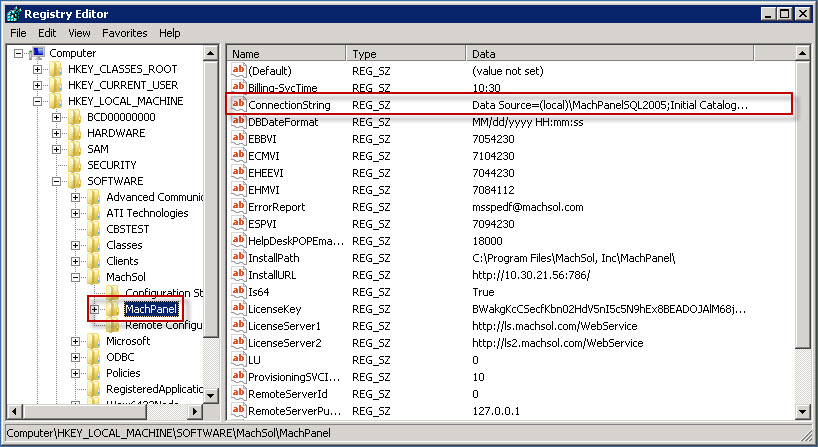
The default connection string is: Data Source=.\machpanelsql2005;Initial Catalog=MachPanel_Db;User ID=MachPanel_Db;Password=D4006127e$;
You will have to modify above string to add Failover Server name after the principal server:
Data Source=.\machpanelsql2005;Failover Partner=;Initial Catalog=MachPanel_Db;User ID=MachPanel_Db;Password=D4006127e$;
For example you have second SQL server SQL2 then connection string would be:
Data Source=.\machpanelsql2005;Failover Partner=sql2;Initial Catalog=MachPanel_Db;User ID=MachPanel_Db;Password=D4006127e$;
Note: Please note that we can perform SQL Mirroring configuration for you under professional services, let us know if you are interested.